
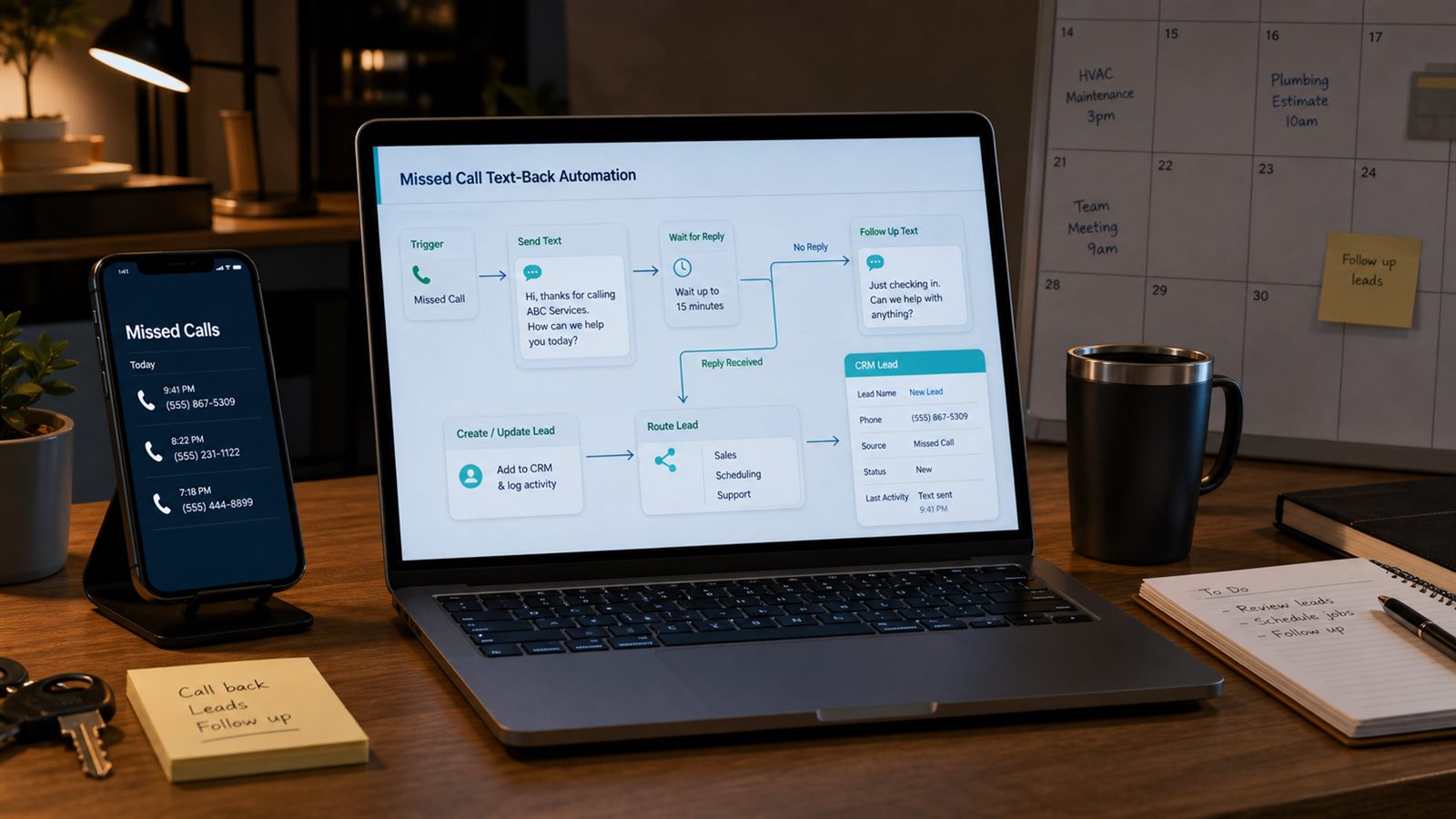
A missed call is not always a lost lead, but it becomes one quickly when nobody follows up. Local service businesses often receive calls while technicians are driving, the front desk is helping another customer, or the office is closed. The customer may call the next company before anyone listens to voicemail.
A missed-call text-back workflow sends a short, useful SMS after an unanswered call, captures the customer’s need, and routes the lead to the right place in the CRM or inbox. The goal is not to pretend a human answered. The goal is to acknowledge the call, make the next step easy, and stop leads from disappearing between the phone system and the sales process.
Editorial note: This guide is an independent workflow tutorial. It does not contain affiliate links.
When this automation is useful
This workflow fits plumbers, HVAC companies, clinics, repair shops, cleaning services, consultants, installers, and other businesses where a phone call often signals urgent buying intent. It is especially useful when calls arrive outside office hours or when one person handles both operations and customer communication.
Do not use it as a generic marketing blast. A missed-call text-back should respond to a recent inbound call and should give the customer a clear way to continue or stop. If your business already tracks consent, connect this workflow to your customer communication consent log before increasing volume.
What the workflow should do
A safe minimum workflow has six jobs:
- detect an unanswered inbound call;
- check whether the number should receive a text;
- send one immediate acknowledgement message;
- wait for a reply or callback;
- create or update a CRM lead with the call source;
- route urgent or high-value leads to staff.
The best first version is small. One message, one lead record, and one owner is better than a complex sequence that texts every caller repeatedly.
Step 1: Define which missed calls qualify
Not every missed call should trigger a text. Start with a narrow trigger such as: inbound call, business number, no answer, call duration under a short threshold, caller number available, and no open opt-out or suppression flag. Exclude internal numbers, spam-labeled calls, repeat calls inside a short window, and customers who already have an active service case.
Use a dedupe window. If the same customer calls three times in five minutes, the workflow should not send three identical texts. Store the caller number, call time, trigger ID, and last message status so retries do not create noise.
Step 2: Keep the first message honest
The first text should acknowledge the missed call without overpromising. A practical template is:
Thanks for calling [Business Name]. We missed your call. Reply with what you need help with, or call us again and we will follow up as soon as possible. Reply STOP to opt out.
Avoid language such as “confirmed,” “approved,” or “guaranteed.” The business has not reviewed the request yet. If the caller asked about scheduling, connect the reply to a workflow like booking conflict checks before sending any final appointment confirmation.
Step 3: Use webhooks to receive replies
SMS automation should be two-way. Twilio’s Messaging webhook documentation explains that Twilio can send inbound message data to a webhook URL so an application can process the message and respond. n8n’s Webhook node provides a no-code way to receive HTTP requests and start a workflow from them.
In practice, the reply webhook should identify the phone number, find the matching missed-call event, attach the message to the lead record, and decide whether to create a task, notify staff, or ask one clarifying question. Do not let replies sit only inside the SMS provider dashboard.
Step 4: Create or update the lead record
The missed call should become structured data. At minimum, store:
- caller phone number;
- call date and time;
- source number or location;
- call status: missed, text sent, reply received, callback completed;
- customer reply text;
- assigned owner;
- next follow-up due time.
If the caller already exists, update the record instead of creating a duplicate. This pairs naturally with a duplicate lead check. Use phone number matching carefully: normalize country codes and local formats before comparing records.
Step 5: Route urgent replies faster
Some replies should move ahead of normal follow-up. Route to staff immediately when the message includes emergency language, same-day service requests, complaints, cancellations, payment issues, or a high-value service keyword. Lower-urgency replies can create a CRM task or inbox item.
If your team already uses first-response SLA alerts, treat missed-call replies as a lead source with its own timer. The timer should start when the missed call or reply arrives, not when someone manually opens the CRM.
Step 6: Respect opt-outs and quiet hours
Twilio’s advanced opt-out documentation covers standard opt-out handling such as STOP, START, and HELP behavior for messaging services. Your workflow should store opt-outs in a place the whole business respects, not only inside one automation tool.
Also decide when not to send. If a call arrives late at night, a text may still be useful for urgent services, but many businesses should use quiet-hour rules or a softer after-hours message. The right rule depends on the service category, customer expectations, and local requirements. This article is workflow guidance, not legal advice.
Step 7: Stop after the right number of touches
A missed-call text-back is not a long nurture campaign. A safe sequence is usually:
- Immediate acknowledgement after the missed call.
- One staff task or alert if the customer replies.
- One follow-up reminder only when the business has a clear reason and permission to send it.
If the lead needs a quote, move it into a quote workflow such as quote expiry reminders. If the reply is a support issue, route it like customer support email triage rather than treating it as a new sales lead.
What to measure
Measure operational outcomes, not just text volume:
- missed calls detected;
- texts successfully sent;
- reply rate;
- callbacks completed;
- leads created or updated;
- duplicate records avoided;
- opt-outs and complaints;
- average time to human follow-up.
If reply rate is low, the message may be too vague or too late. If opt-outs rise, the workflow may be texting numbers that should have been excluded. If staff still miss replies, the routing step is the real problem.
Common failure modes
Texting every missed call
Spam calls, wrong numbers, existing customers with open issues, and recently opted-out contacts need exclusion rules. The trigger should be selective.
Creating duplicate leads
Phone numbers often appear in different formats. Normalize them before matching CRM records.
Letting replies stay in the SMS tool
A reply should update the CRM and alert an owner. Otherwise the automation only moves the missed lead from one inbox to another.
Sending too many follow-ups
One missed-call acknowledgement is useful. A long automated sequence can feel intrusive when the customer only tried to call once.
A safe minimum setup
- Connect your phone system or SMS provider to a webhook trigger.
- Filter for unanswered inbound calls only.
- Check suppression, opt-out, duplicate, and recent-message rules.
- Send one honest acknowledgement text.
- Create or update the CRM lead with source “missed call”.
- Route replies to the right owner.
- Track outcomes weekly and remove noisy rules.
This is a useful automation because it solves a specific gap: a customer tried to reach the business and did not get an answer. Keep the workflow narrow, transparent, and connected to human follow-up.