Customer calls often contain the details a business needs later: what the customer asked for, what was promised, which appointment was discussed, whether a quote was approved, and what follow-up is required. When those details stay only in memory or scattered call notes, the next team member starts with incomplete context.
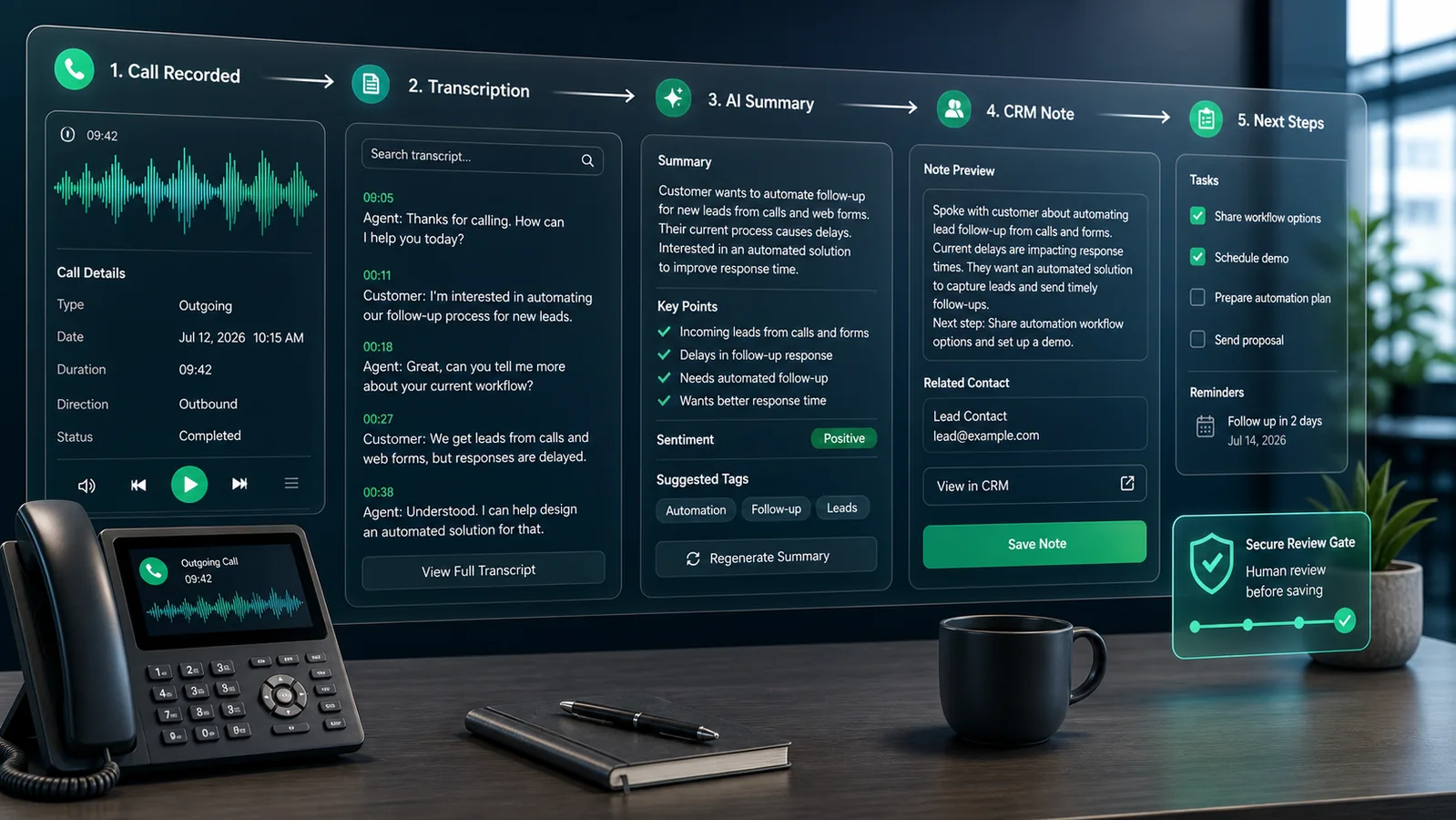
A call summary note workflow turns a completed call into a reviewed CRM note. The automation captures the call event, prepares a transcript or summary, highlights follow-up actions, and saves the final note in the CRM after a human check. It is useful for service companies, agencies, consultants, sales teams, clinics, repair businesses, and any operation where phone conversations drive the next step.
Important consent note
This article is educational and not legal advice. Call recording and transcription rules vary by country, state, industry, and call type. Before recording or transcribing calls, confirm the consent rules that apply to your business and customers. If consent is unclear, use manual call notes instead of automatic recording.
What the workflow should do
The workflow should capture the call metadata, identify the customer or lead, create a transcript when recording is permitted, generate a concise summary, route uncertain cases for review, and store the approved note in the CRM. The goal is not to create a perfect transcript archive. The goal is to preserve the business decision points from each call.
Recommended workflow
1. Capture the call event
Start with the phone system or call tracking platform. Twilio Voice webhooks can notify your application about call events, while the Twilio Recording API documents recording resources and related metadata. Use this event to capture the call ID, caller number, direction, start time, end time, recording status, and the internal team member if available.
2. Match the call to a CRM record
Before summarizing anything, match the call to a contact, lead, deal, appointment, or ticket. Use caller number, form tracking number, recent booking, open quote, or CRM owner. If the automation cannot match confidently, create a review item instead of saving the note to the wrong customer.
3. Transcribe only when permitted
When recording and transcription are allowed, send the audio to a speech-to-text system. The OpenAI speech-to-text guide explains how audio can be transcribed into text. Keep the transcript secure, avoid unnecessary retention, and do not send sensitive payment details or private credentials into downstream tools.
4. Generate a structured summary
Ask the AI step for a compact business note rather than a long paragraph. A useful format is: reason for call, customer need, promised next step, deadline, owner, risk flags, and unresolved questions. If the model is unsure, it should say what is missing instead of inventing details.
5. Add a human review gate
Do not automatically save every AI summary as final. Route low-confidence matches, complaints, refund discussions, legal or safety issues, and unclear commitments to a reviewer. A Slack incoming webhook can notify a private operations channel, but the webhook URL must be treated as a secret and the message should link to the secure record rather than exposing full customer details.
6. Save the approved note in the CRM
After review, save the approved note to the CRM record. Pipedrive’s Notes API is one example of a CRM notes endpoint that can create note records associated with CRM objects. The same pattern applies to other CRMs: store the approved summary, source call ID, timestamp, owner, and follow-up task link.
Fields to include in the CRM note
- Call date, time, direction, and duration
- Customer or lead ID
- Reason for call
- Key decision or request
- Promised follow-up and deadline
- Assigned owner
- Review status and reviewer name
Quality checks before launch
Test the workflow with short calls, long calls, noisy calls, missed matches, duplicate contacts, complaints, quote approvals, and calls with no clear next step. Confirm that summaries do not invent commitments, wrong matches go to review, and the CRM note is easy for a salesperson or service coordinator to understand later.
Suggested review rules
Not every call needs the same review depth. A short scheduling call with a confident CRM match can go to a light review queue. A complaint, refund discussion, pricing dispute, safety concern, or call with uncertain customer identity should require manager review before the CRM note is treated as final. If the transcript contains unclear names, dates, prices, or commitments, the automation should mark those fields as uncertain instead of guessing.
Use the review data to improve the system. Track which summaries were accepted, edited, rejected, or escalated. If reviewers often correct the same field, such as appointment date or promised price, tighten the prompt, improve the CRM context, or require that field to be verified manually.
A practical first version
Start with one call source and one CRM pipeline. For the first version, summarize only calls longer than a set duration and only when the caller is matched to an existing contact. Store the summary as draft or review-needed until someone approves it. After two weeks, review false matches, weak summaries, and missing action items before expanding the automation.
Limitations
Call summaries are only as good as the recording quality, transcript accuracy, customer matching, and review process. Accents, background noise, poor phone connections, and industry-specific terms can reduce accuracy. The system should keep the original call reference available for review and avoid treating AI summaries as unquestionable records.
The practical result is cleaner handoffs. A team member can open the CRM and see what happened on the call, what needs to happen next, and who owns the follow-up.
Sources used
- Twilio Voice webhooks
- Twilio Recording API
- OpenAI speech-to-text guide
- Pipedrive Notes API
- Slack incoming webhooks
Related GainEdge guides
Measurement worksheet: apply this workflow to a real operation
Illustrative example—not a client result: Capture a seven-day baseline before enabling actions. Record total eligible events, automated passes, human-review cases, holds, duplicate attempts, and corrections. Then calculate the exception rate as human-review cases divided by eligible events. Track leads needing manual correction divided by leads processed separately; a falling exception rate is not useful if incorrect actions increase.
Minimum data contract
| Field | Purpose | Validation rule |
|---|---|---|
| event_id | Prevents duplicate processing | Required and unique |
| record_id | Connects the event to the current lead and source record | Must resolve before action |
| source_updated_at | Detects stale data | Must be newer than the last processed version |
| decision_state | Stores pass, review, or hold | Never default an unknown value to pass |
| decision_reason | Makes the result auditable | Required for review, hold, and overrides |
| owner | Assigns exceptions to the sales operations owner | Must name a role or queue |
Workflow diagram
- Trigger: receive a new lead, reply, assignment, or follow-up event and store its unique event ID.
- Retrieve: load the newest lead and source record; reject stale or unmatched data.
- Validate: check required fields, permissions, consent, and approved business rules.
- Decide: return pass, review, or hold with a plain-language reason.
- Act: perform only the approved action, then write the result and timestamp.
- Measure: review exceptions weekly and use leads needing manual correction divided by leads processed as a quality signal.
Failure tests before launch
- Send the same event twice and confirm the second copy makes no customer-facing change.
- Remove one required field and confirm the record enters review rather than passing.
- Use an older source timestamp and confirm the workflow refuses to overwrite newer data.
- Disconnect the destination system and confirm the action is queued with an accountable owner.
- Test an approved override and verify that the person, reason, and time are retained.
Keep the first review small: 20–50 shadow-mode events are usually enough to reveal field-mapping and ownership problems without pretending to establish a universal benchmark. Document the baseline, the rule version, and every disagreement between the workflow and reviewer.
Continue through this topic cluster
Reviewed by the GainEdge Editorial Team on 26 July 2026. See our editorial and corrections policy for sourcing, testing, AI-assistance, and update standards.