AI can help a busy team draft customer replies faster, but automatic sending is usually the wrong first step. A draft may sound confident while missing context, using the wrong tone, promising something the business cannot deliver, or replying to a sensitive complaint without manager review.
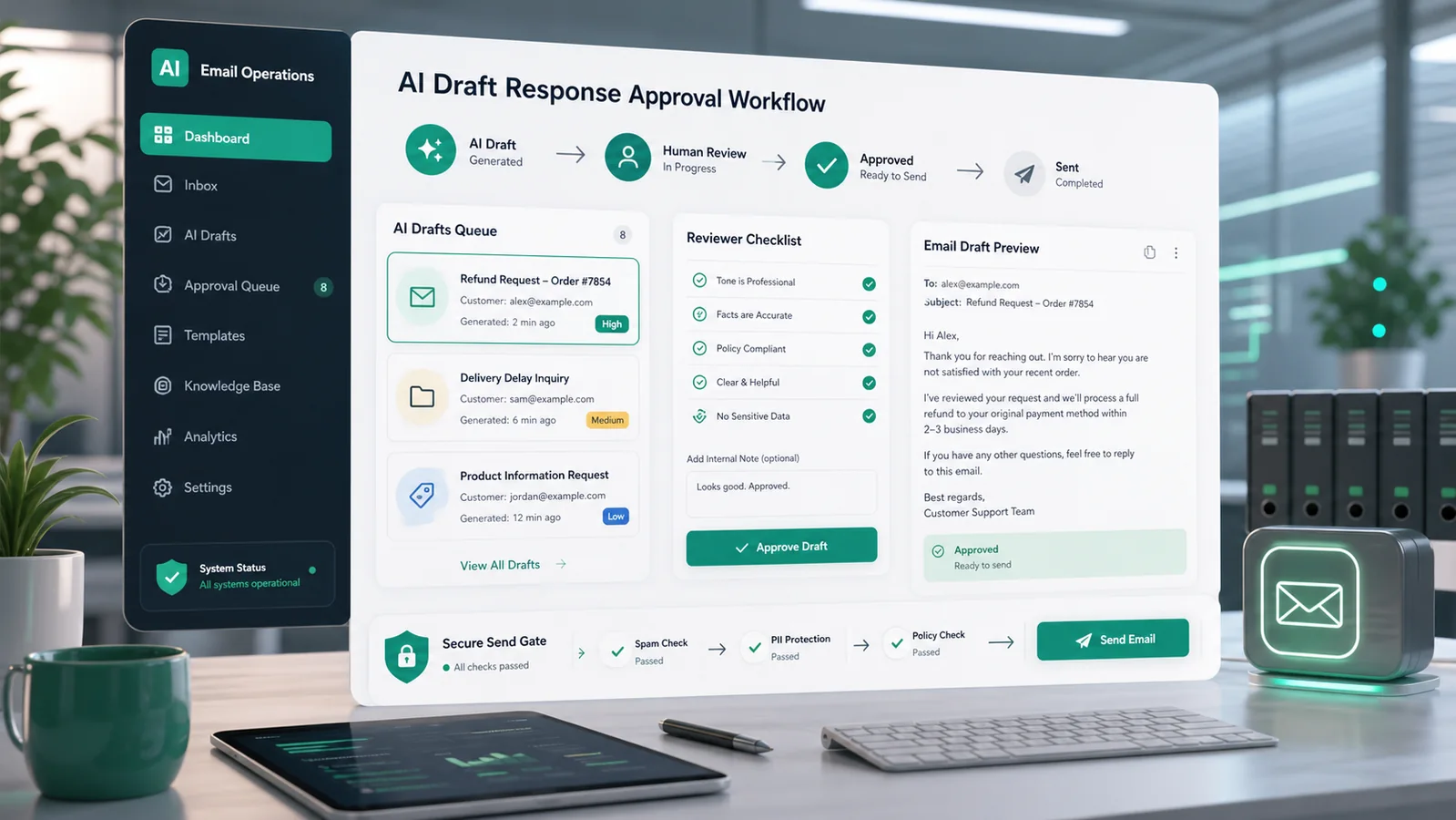
A safer workflow is AI draft response approval. The system prepares a suggested reply, stores it as a draft or review item, routes it to the right person, and sends only after approval. This gives the business speed without removing accountability from customer communication.
When this workflow is useful
This workflow is useful for support inboxes, quote follow-up, appointment rescheduling, complaint replies, refund questions, document requests, onboarding emails, and recurring customer service updates. It is most useful when messages are repetitive enough for AI assistance but important enough that a human should confirm the final answer.
What the automation should do
The automation should collect the customer message, gather relevant context, generate a draft reply, flag risk signals, create a review task, and prevent sending until a reviewer approves. The OpenAI text generation guide explains that models can generate text from prompts and that the Responses API is the recommended path for direct text-generation requests. For production prompts, the same documentation recommends keeping prompt builders in code with tests and review rather than treating prompts as hidden one-off settings.
Recommended workflow
1. Capture the incoming message and context
Start with the inbox or CRM queue that handles customer replies. Store the customer message, customer ID, thread history, order or appointment reference, service status, and any policy notes that the reviewer needs. Avoid sending private API keys, payment details, or unrelated personal data into the draft process.
2. Generate a draft, not a final send
The AI step should output a draft response, a short reason for the suggested answer, and any missing information it noticed. Use a consistent structure so reviewers can scan quickly: summary, proposed reply, confidence level, missing details, and recommended next action.
3. Run safety and policy checks
OpenAI’s safety best practices recommend moderation and human oversight. For customer email drafts, risk checks should look for abusive content, medical or legal claims, refund promises, discount promises, angry tone, private data exposure, and anything that conflicts with the business policy. When risk is high, route the draft to a manager instead of a general inbox user.
4. Create an approval task
Send the draft to the place where the team actually reviews work. A Slack incoming webhook can post a structured notification to a channel, but the webhook URL is a secret and should never be shared publicly or stored in public code. The alert should include a secure internal link to the draft, not full private customer details in a public channel.
5. Save the email as a draft
If Gmail is the sending system, the Gmail API can create draft emails. Google’s Gmail draft guide explains that a draft is an unsent message with the DRAFT system label and that sending a draft deletes the draft and creates a new sent message. The page was last updated on 2026-06-03. This supports a useful separation: AI prepares the draft, but the approval step decides whether it is sent.
6. Log the approval decision
Record who approved, edited, rejected, or escalated the draft. Store the final status, timestamp, and reason for rejection if the AI draft was not used. This review history helps the business improve prompts, policies, and training examples over time.
Fields to track
- Customer or ticket ID
- Incoming message source
- AI draft version
- Risk level and risk reason
- Reviewer name or role
- Approval status
- Final sent message ID if approved
Quality gates before launch
Test the workflow with ordinary questions, angry complaints, refund requests, unclear customer messages, sensitive data, and messages where the correct response is to ask for more information. Confirm that the AI cannot bypass approval, that rejected drafts do not send, and that reviewers can edit the draft before approval.
Where to start
Start with one narrow message type, such as appointment reschedule replies or document request follow-up. Build the approval queue around that use case first. After the team trusts the process, expand to more message types. This is more reliable than trying to automate every customer reply at once.
A practical first version
A simple first version can run with three states: draft created, waiting for review, and approved or rejected. The automation should create the AI draft, save it in the ticket or email draft area, notify the reviewer, and wait. If the reviewer approves, the system can send the approved draft or move it to a final send queue. If the reviewer edits the draft, store the edited version as the source of truth.
This first version should also include a timeout rule. If a customer-facing draft waits too long, route it to a backup reviewer or manager. That prevents the approval step from becoming a new bottleneck. Keep the first dashboard simple: pending drafts, high-risk drafts, rejected drafts, and average approval time.
Limitations
AI drafts can be useful, but they can still be incomplete, overconfident, or wrong. They may miss business-specific policy details unless the workflow provides the right context. A human approval step is not just a safety feature; it is how the business keeps responsibility for the message it sends.
The practical result is faster drafting with controlled sending. The team spends less time starting from a blank page while still reviewing the final customer communication.
Sources used
- OpenAI API text generation guide
- OpenAI API safety best practices
- Gmail API create and send draft emails, last updated 2026-06-03
- Slack Developer Docs: incoming webhooks
Related GainEdge guides
Decision and comparison matrix: apply this workflow to a real operation
Illustrative example—not a client result: Compare three choices for every decision: automate, route for review, or stop. Automate only when the campaign and contact record is complete and the rule is deterministic. Route for review when evidence exists but conflicts. Stop when an identifier, consent state, required approval, or source system is unavailable.
Minimum data contract
| Field | Purpose | Validation rule |
|---|---|---|
| event_id | Prevents duplicate processing | Required and unique |
| record_id | Connects the event to the current campaign and contact record | Must resolve before action |
| source_updated_at | Detects stale data | Must be newer than the last processed version |
| decision_state | Stores pass, review, or hold | Never default an unknown value to pass |
| decision_reason | Makes the result auditable | Required for review, hold, and overrides |
| owner | Assigns exceptions to the marketing operations owner | Must name a role or queue |
Workflow diagram
- Trigger: receive a campaign, form, email, or workflow event and store its unique event ID.
- Retrieve: load the newest campaign and contact record; reject stale or unmatched data.
- Validate: check required fields, permissions, consent, and approved business rules.
- Decide: return pass, review, or hold with a plain-language reason.
- Act: perform only the approved action, then write the result and timestamp.
- Measure: review exceptions weekly and use failed or corrected campaign records divided by records processed as a quality signal.
Failure tests before launch
- Send the same event twice and confirm the second copy makes no customer-facing change.
- Remove one required field and confirm the record enters review rather than passing.
- Use an older source timestamp and confirm the workflow refuses to overwrite newer data.
- Disconnect the destination system and confirm the action is queued with an accountable owner.
- Test an approved override and verify that the person, reason, and time are retained.
Keep the first review small: 20–50 shadow-mode events are usually enough to reveal field-mapping and ownership problems without pretending to establish a universal benchmark. Document the baseline, the rule version, and every disagreement between the workflow and reviewer.
Continue through this topic cluster
Reviewed by the GainEdge Editorial Team on 26 July 2026. See our editorial and corrections policy for sourcing, testing, AI-assistance, and update standards.